
For the well-addressed celebration
You designed the invitation. Let us handle the addressing.
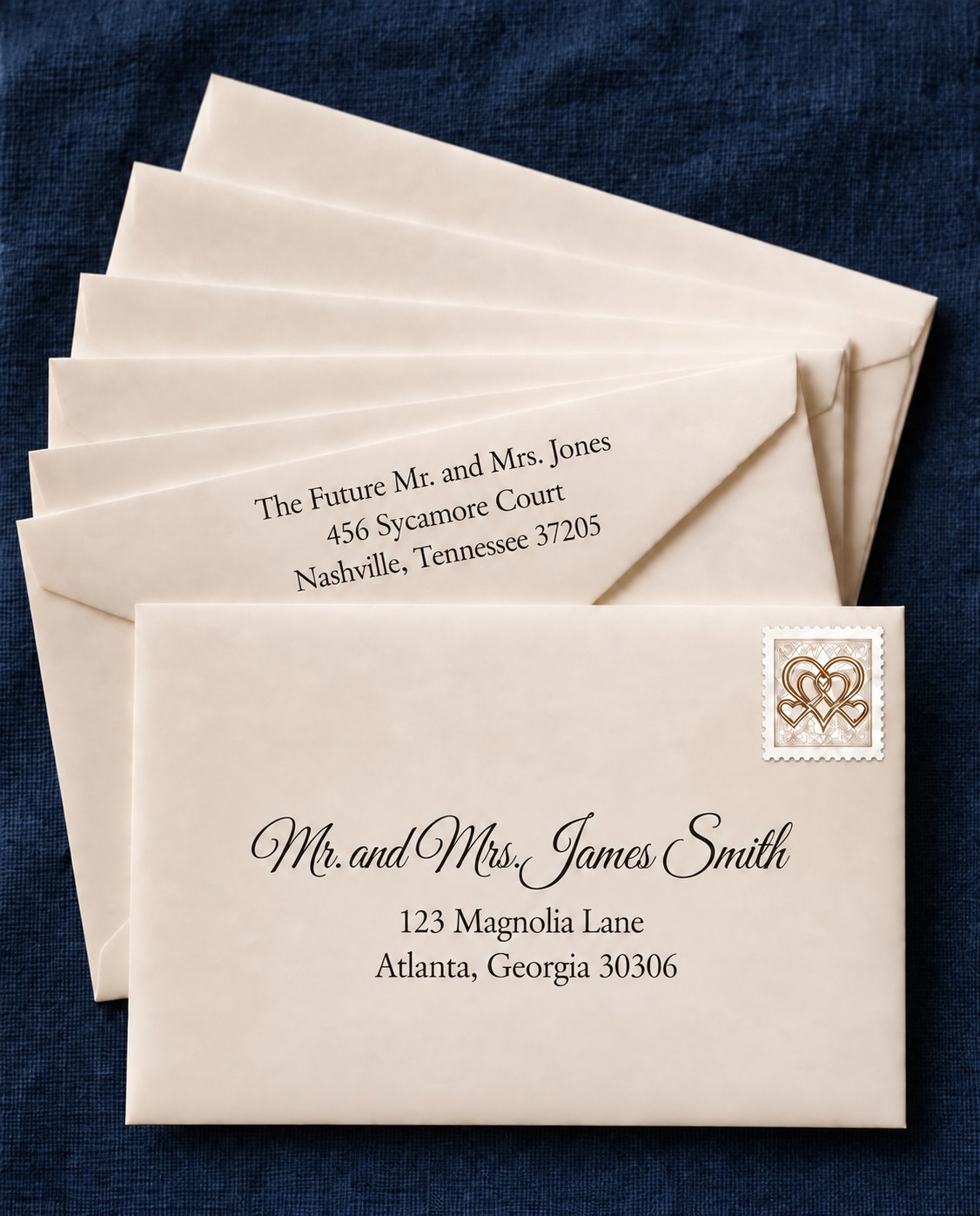
$15 through Oct. 31 for 12 months of print-ready envelope PDFs. Every event, every reprint. No automatic renewal.
Every envelope tells someone they matter. Sealed With Style prepares beautifully addressed envelopes using traditional etiquette, elegant typography, and print-ready PDFs, so you can spend less time formatting addresses and more time celebrating.
Download our guest list template, add your guests, and upload it to receive beautiful, etiquette-ready envelope PDFs in minutes.
Don’t have the addresses yet? Send guests a private link and let them enter their own. You can collect addresses at no cost, even before you order. You can also enter guests by hand.
Loved for weddings — and just as lovely for holiday cards, graduation announcements, baby and bridal showers, birthdays, and business correspondence. Beautifully addressed envelopes for life's celebrations.
- Print at Home
- Local Print Shop
- Online Print Shop
- Instant PDF
- Every Celebration
How it works
From guest list to print-ready, in three steps.
- 01
Start with Your Guest List
Start with our guest list template, upload an existing spreadsheet, or collect addresses directly from guests with a private link.
- 02
We'll Handle the Etiquette
Titles, honorifics, household formatting, address styles, and etiquette are automatically prepared.
- 03
Download Print-Ready PDFs
Print at home, use a local print shop, or download files prepared for supported professional printing.
Behind every envelope is expert etiquette. Sealed With Style automatically prepares names, titles, household formatting, and addresses using traditional etiquette guidelines, so every envelope is ready to print with confidence.
Made your invitations in Canva? Your envelopes can still match.
You have your invitations. Now make addressing the envelopes just as easy. Sealed With Style turns your guest list into print-ready envelope PDFs, with 20 curated addressing styles to complement your stationery. Choose your envelope size, select who should appear on each envelope, and preview your names and addresses. No mail merge or manual text placement needed.
Already have blank envelopes? Use them when their dimensions match a supported size. Print your PDF at home with a compatible printer, or ask a local print shop whether it can print on your envelopes.
Still gathering addresses? Collecting addresses is free, even before you purchase a Printing Pass.
Sealed With Style is an independent service and is not affiliated with Canva.
Gather addresses without the group texts.
Send one private link. Guests add their own addresses in a minute, no account needed, and everything lands in your address book, ready to address.
Collecting addresses is always free — no account fee, no time limit. You only pay for print-ready envelope PDFs. Address-book sharing and CSV export are free too.
Choose a style that feels like you.
Browse all 20 addressing styles, from timeless serif lettering to romantic scripts and mixed-font pairings.
1 of 20
Tell us what you have in mind, and we’ll let you know whether it can be added to your celebration.
Etiquette you can trust.
- Etiquette based on Emily Post
- Titles, honorifics, and household formatting handled automatically
- USPS-ready addresses
- Print-ready files for home, local, and supported professional printing
Perfect for:
Weddings · Holiday Cards · Baby Showers · Bridal Showers · Graduations · Birthdays · Anniversaries · and every celebration worth remembering.
Questions
Frequently asked questions
- How do I address wedding envelopes?
- Traditional formal etiquette pairs each guest with the right title and honorific, keeps a household on one line where it belongs, and spells out the state in full. If you choose Standard formatting, Sealed With Style uses USPS abbreviations instead. Sealed With Style applies your selected formatting to your whole guest list automatically, so you don't have to look up each rule.
- Can I upload my guest list?
- Yes — start with our easy guest list template. It's the recommended and fastest path: download it, add your guests, and upload the completed file. You can edit any name or address afterward, and your address book stays in your account for next year's cards. Prefer to enter guests individually? You can also add them manually.
- Can I collect addresses directly from guests with a link?
- Yes, and collecting addresses is free. Create a private, mobile-friendly collection link and text or email it to friends and family. Guests fill in their names and mailing address in about a minute — no account and no app needed — and every reply lands in your Address Book, ready to add to any envelope order.
- Can I share my list with a co-host or family member?
- Yes. You can send a private copy of your list to another Sealed With Style account, so a mother of the bride, a co-host, or a family member can accept those households into her own Address Book. Each side keeps its own independent copy, and matching households are skipped instead of duplicated.
- What addressing styles can I choose from?
- Sealed With Style includes 20 addressing styles, from classic serif and modern options to romantic scripts and six mixed-font pairings. You can preview every style before choosing, including Signature Script Pairing, Romantic Elegance Pairing, Delicate Script Pairing, Romantic Monoline Pairing, Engraved Grace Pairing, and Parisian Charm Pairing. You can also add an optional front script line in Qwigley, WindSong, Allura, or Great Vibes.
- Does Sealed With Style follow proper wedding etiquette?
- It does. Titles, honorifics, married and unmarried couples, doctors, military ranks, children, and unnamed plus-ones are all handled using traditional etiquette guidelines, and anything genuinely ambiguous is brought to you for a quick decision.
- What file do I receive?
- Your files depend on the printing path you choose. Standard print-at-home and local-print-shop orders include a true-size recipient-envelope PDF and, when selected, a separate back-flap PDF. Inner-and-outer suites include files for both envelopes. The TOG.ink Professional Print Suite provides two Professional Printing files, one for the outer envelope and one for the inner envelope.
- Can I download my address book?
- Yes. Your contacts are always saved securely in your account, and you can download them as a CSV anytime, free.
- Can I print the envelopes myself?
- Yes. Print at home on your own printer at Actual Size (100%), or download the appropriate PDF for a local print shop or online print service. We recommend running one test envelope first when printing at home.
- How do I print addresses on envelopes for save-the-dates I designed in Canva?
- Create your save-the-dates in Canva, then use Sealed With Style to prepare the envelope addresses separately. Upload your guest list using our spreadsheet template or enter your recipients manually. Choose an addressing style and the envelope size that matches your actual envelopes, preview your selections, and download your print-ready PDF with a Printing Pass. Print at Actual Size or 100%, rather than Fit to Page. Check that your printer supports your envelope size and thickness, and test one envelope before printing the full list. You can also ask a local print shop whether it can print the PDF on your envelopes.
- Can I print wedding envelopes without mail merge?
- Yes. Sealed With Style creates an envelope-addressing PDF from your guest list without Microsoft Word or mail merge. Choose your envelope size and addressing style, select the recipients for each envelope, and preview the results. You can change the style and formality without rebuilding your guest list.
- Does Sealed With Style print and mail my envelopes?
- Sealed With Style provides print-ready digital PDF files. We do not print, supply, or mail envelopes. You can print the files at home with a compatible printer or arrange printing with a local or professional printing service. Confirm the printer's file requirements and whether it accepts your envelopes before ordering printing.
- Do I need to buy new envelopes?
- You can use blank envelopes you already have, including envelopes supplied with your invitations, when their dimensions match a size supported by Sealed With Style. Measure your actual envelopes before choosing a size. A7 envelopes measure 5¼ × 7¼ inches, but check yours rather than assuming the size. Your printer or print shop must also be able to handle the envelope dimensions, thickness, and flap shape. Test one envelope first.
- Are envelope liners included?
- Yes. The Printing Pass includes our envelope liner designer: upload any photo, pattern, or artwork and download print-ready liner PDFs. Liners are available for Euro-flap envelopes in A7, A6, A8, and A2, plus square-flap in A7. You can preview liners free in the demo; printing them requires an active Printing Pass.
- Can I make belly bands?
- Yes. The Printing Pass includes our belly band designer in three styles: Classic (names and date), Decorative (your own pattern or artwork), and Vellum (a simple monogram). Choose a 1, 1.5, or 2 inch width and an 11, 11.5, or 12 inch length, or enter your own. Bands print at home at Actual size (100%) with straight cut lines; 11 inch bands print on Letter paper and longer bands on Legal paper. You can preview belly bands free in the demo; printing them requires an active Printing Pass.
- Can I make envelope seals?
- Yes. The Printing Pass includes our envelope seal designer: upload your own artwork or type a monogram, names, and date in our addressing fonts. Choose 1.5, 2, or 2.5 inch round seals and print at home on round label sheets laid out for Avery 8293, 22807, and 22808, or on any matching round sticker sheet. You can preview seals free in the demo; printing them requires an active Printing Pass.
- Do I need to cut my own vellum wrap?
- If you bought pre-printed vellum wraps, you usually need to trim them to fit your suite. The Printing Pass includes a vellum wrap cutting template: choose a 5×7 or A6 suite preset or enter your own size, then print a guide with straight cut lines at Actual size (100%). Measure around your stacked suite and add 1 inch for overlap.
- What if I need to fix a name or address after I download?
- While your Printing Pass is active, open the celebration in My Celebrations, fix any name, address, guest, or styling, and we'll prepare a fresh PDF at no extra charge. Envelopes you've already created can always be re-downloaded free, even after your pass ends.
- What happens when my Printing Pass ends?
- Your address book stays, and address collection, sharing and CSV export are always free. You can still download any envelopes you've already created. To make changes or create envelopes for a new event, just get a new Printing Pass. There's no automatic renewal.
- Can I use this for holiday cards or business mail?
- Absolutely. While many customers use Sealed With Style for wedding invitations, it's also perfect for holiday cards, graduation announcements, baby showers, retirement celebrations, business correspondence, thank-you cards, and sympathy cards.
- Can I choose a different ink color for my envelope addresses?
- Yes — for envelopes you print yourself, whether at home or through a local print shop or office supply store, choose from ten curated ink colors on the style page: Classic Black, Navy, Burgundy, Forest Green, Warm Gray, Taupe, Sage, Dusty Blue, Terracotta, and Espresso. The color applies to both the recipient address and your return address together.
- Can I use my PDF with TOG.ink?
- Yes. Sealed With Style offers Professional Printing files formatted for TOG.ink for both a single A7 envelope and the supported inner-and-outer A8 suite. If you are using a single A7 envelope, choose the Professional Printing option to create a TOG.ink-ready file for your addressed envelopes. If you are using inner and outer envelopes, select Yes to using inner and outer envelopes, then choose the TOG.ink Professional Print Suite. Sealed With Style will create two Professional Printing files, one for the outer envelope and one for the inner envelope. Download your files and submit them to TOG.ink for printing. Review your PDFs before placing your order. Professional Printing files are created in solid black ink. TOG.ink is a trademark of its respective owner. Sealed With Style is not affiliated with or endorsed by TOG.ink.
Why people choose Sealed With Style
Built for the details that matter.
Etiquette-checked, every time
Titles, married and unmarried couples, doctors, judges, and children are formatted the traditional way — without you second-guessing a single line.
Your address book, saved for future celebrations
Collect addresses with a private link or upload what you already have. Your list stays in your account, so next year's holiday cards start from where this year's left off.
Print-ready in minutes
Download a true-size PDF that lines up on your envelopes, with an alignment test page so you can check placement before you print your envelopes.
True-size files are available for A2, A6, A7, A7½, A9, square, and #10 envelopes, with no special software required. Formal inner-and-outer suites are also available for print-at-home, local print shop, and TOG.ink professional printing — see how inner and outer envelopes are addressed in the Etiquette Guide.
Choose from twenty carefully paired addressing styles.
$15 through Oct. 31 for 12 months of print-ready envelope PDFs. Every event, every reprint. No automatic renewal.
Looking for a different font or style? Send us a request.