September 27, 2026 · 7 min read
The Easiest Way to Collect Wedding Guest Addresses Without Chasing Everyone Down
Collect wedding guest addresses with one private link, keep households organized, share family lists, and turn your event list into addressed, print-ready envelopes.
You have the guest list. Now you need everyone’s current mailing address, the names they want on the invitation, and perhaps the names of children in each household. A few people reply to your text immediately. Others send an address with no ZIP code. Someone’s parent has a list from three Christmases ago. Before long, the addresses are scattered across messages, emails, and spreadsheets.
The easiest way to collect wedding guest addresses is to send one address-collection link and let each household enter its own details. Keep those replies in a central address book, then make a separate list of the households you are actually inviting to this event. You can still call or text the few people who need a personal nudge.
Start with households, not just individual names
Before asking for addresses, make a rough list of the people you plan to invite. Group couples and families by mailing household. Decide whether you need a partner’s name, children’s names, or a separate invitation for an adult child who lives at the same address. You do not need to settle every envelope-etiquette question yet. You just need enough information to avoid asking someone for the same address twice.
Ask guests for their preferred mailing address, including an apartment or suite number. An address saved in your phone, a holiday-card list, or an old spreadsheet may no longer be current. Having guests enter it themselves also saves you from retyping an address from a text message.
Send one clear request that is easy to answer
A good address request says who it is from, why you need the information, and where to enter it. For example:
Hi! We’re gathering mailing addresses for our wedding invitations. Would you share the address you’d like us to use here? [Your private link] Thank you!
Send the link by text or email, or ask a parent to forward it to relatives they know best. Give people a reasonable deadline before your invitation-printing date. Keep a short follow-up list for anyone who has not replied. A link makes the responses easier to manage; it does not mean you will never need to remind Uncle Bob.
What guests should be able to do
Look for a form that works on a phone and does not require every guest to make an account or upload a spreadsheet. Ideally, one person can enter the household’s names and mailing address in one sitting. Make any marketing signup optional and separate from the address request.
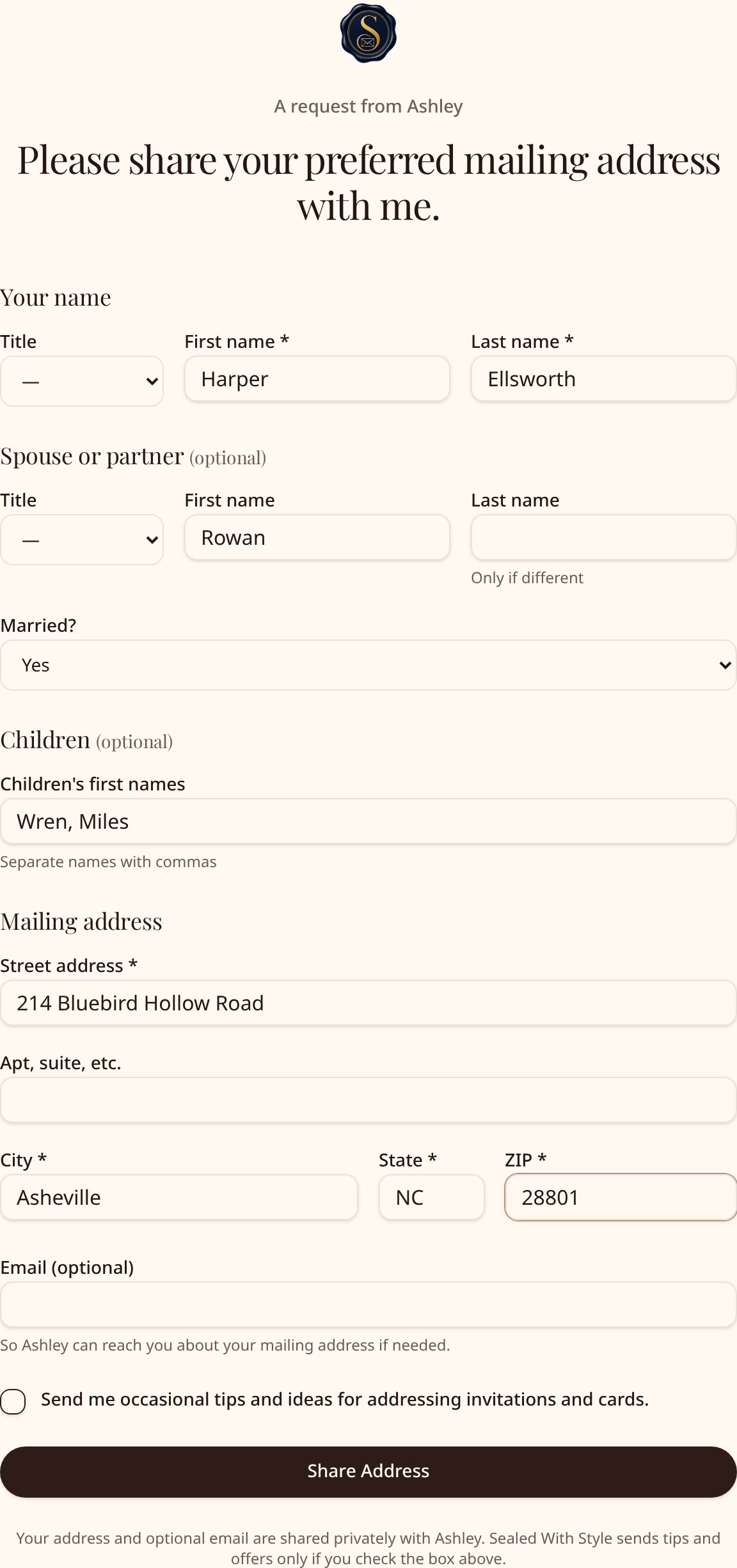
With Sealed With Style, you create a free private collection link from your Address Book. You can give the link an event name, put your name on the request, add a note, and edit one of the ready-to-send messages before copying it. When a guest opens it, they see who is asking and the note you wrote. The form asks for their name and mailing address, with optional fields for a spouse or partner, children’s first names, and an email address. Guests do not need a Sealed With Style account. After they submit, they see a confirmation and a preview of their addressed envelope. They can tap between a few etiquette formats to see how the names could appear; the host makes the final choices for the event.
The host does not have to copy those replies into a separate file. Each submitted household appears in the host’s Address Book, with its collection source shown. Collecting addresses is free; payment comes later if you choose to create envelope files.
Keep the master address book separate from this wedding’s mailing list
Your address book can include more people than this particular invitation list. That is useful if you also send holiday cards, host a shower, or plan another family event. Keep the collected addresses as your reusable pool, then decide which households belong on each mailing.
In Sealed With Style, you can start an event by naming it and adding an optional date. On its guest-list screen, choose “Choose households…” to pick particular people from your saved Address Book, use “Add all saved households” if everyone belongs on this mailing, upload a CSV or Excel guest list, or add a household manually. If you already have event guests, you can append saved households while skipping duplicates. Review the resulting event list and remove anyone who should not receive this mailing. Removing someone from the event guest list leaves that household in the Address Book for another occasion.
This distinction matters when, for example, you collect addresses from your extended family but invite only some of those households to a bridal shower. You can make that event’s list without throwing away the other addresses.
Let family help without passing spreadsheets around
Parents and other relatives may already have the best addresses for their side of the family. They can collect replies with their own link, then share a copy of their Address Book or just the replies from one collection link. Sealed With Style creates a private “Accept list” link for the person receiving it. That person signs in, accepts the group, and gets an independent copy in their own Address Book. Changes to either copy do not update the other person’s list.
From there, the couple can choose just the saved households they want in a particular event. Think of the shared list as a starting pool, not a decision to invite everyone on it. If Mom has 60 family addresses and the wedding list calls for 35 of those households, select those 35 for the event and keep the rest in the Address Book for another occasion.
Why not just use texts, email, or a spreadsheet?
Texts and emails work for a handful of people. For a larger wedding, the extra job is finding every reply again and typing it into a usable list. A spreadsheet is helpful when you already have one, but sending a spreadsheet to every guest asks them to work in your file, and coordinating multiple versions with family gets messy. A simple online form solves the collection problem by letting guests enter their own details in one place.
The next question is what happens after collection. Some couples want an address list for their stationery vendor. Others plan to address and print envelopes themselves. Choose a workflow that matches that next step. Sealed With Style keeps the collected households in an Address Book and lets you carry the event guest list into envelope formatting, rather than starting over with another file.
Turn the finished list into wedding envelopes
Once you have chosen the households for your invitation mailing, review names and addresses before printing. Decide how you want to address couples, guests with different last names, children, and people with professional titles. Sealed With Style offers etiquette and address-formatting choices, then shows each addressed envelope for review. You can edit a particular household before checkout.
For examples of those naming decisions, read How to Address Wedding Invitation Envelopes. When you are ready to move from the event list to files, How to Print Wedding Envelopes From a Guest List covers that next step. Sealed With Style prepares true-size, print-ready envelope PDFs after checkout, with files suited to the printing path you select. If you will use your own printer, follow How to Print Addresses on Envelopes at Home and test one envelope before printing the full stack.
You can try the free demo to see the collection walkthrough and envelope preview, or start your own Address Book below. The collection link gives your guests one easy task. Your saved address book and event list give you a sensible path from their replies to print-ready envelope files.
Frequently asked questions
How do I collect addresses for wedding invitations without a spreadsheet?
Send guests a private address-collection link by text or email. Let each household enter its own names and mailing address, and keep the replies in one address book. You can still add a household manually if someone prefers to give you the address by phone.
Do wedding guests need an account to share their address?
No. Guests who receive a Sealed With Style collection link can complete the form without making an account. The person collecting and managing the addresses uses an account.
Can my parents collect family addresses for us?
Yes. A parent can collect addresses and share a copy of the whole Address Book or the replies from one collection link through a private Accept list link. You can then decide which households belong in your event list.
Can I collect addresses now and use them for holiday cards later?
Yes. Saved households remain in your Address Book for future celebrations. Your wedding, holiday-card, and party mailing lists can include different people from that pool.
Does collecting addresses also address or print my invitations?
Collecting gives you the mailing details. You still review who is invited and how each envelope should read. Sealed With Style can then format the addresses and create print-ready envelope PDFs after checkout. It does not mail invitations for you.
Ready to gather your guest addresses?
Create a free private link, let each household enter its address, and choose who belongs on your event list.
Etiquette guidelines based on Emily Post's Etiquette, The Centennial Edition and emilypost.com. Example names are fictional.